


The Best SmartEX Shinkansen Guide To Buy Tickets Online

Need a last-minute shinkansen ticket? You can buy tickets online through smart ex shinkansen, also written as smartEX. No account setup guesswork here, just a clear path to your seat reservation.
Skip the line at the midori no madoguchi ticket counter. Book your bullet train seat from your own home instead.
This guide covers ticket purchase, seat reservations, and the smartEX app, step by step.
About the Tokaido Shinkansen
The Tokaido Shinkansen opened in 1964. It was Japan's first bullet train line.
This line is the busiest bullet train route in Japan. It carries millions of passengers between Tokyo, Nagoya, and Osaka each year.
Tokaido Sanyo Shinkansen trains offer two seat classes. Choose between an ordinary seat or a Green Car seat.
This line is known for speed, efficiency, and reliability. smartEX makes booking a seat on it simple.
What is smartEX?
smartEX is the official online reservation service for the Tokaido Sanyo and Kyushu Shinkansen. It covers Japan's golden route, connecting Nagoya, Kyoto, and Shin Osaka.
This service is run jointly by JR Central and JR West. JR Kyushu joins for routes reaching Kagoshima.
Traveling north of Tokyo? Use a different platform
smartEX cannot book Sendai, Morioka, Aomori, Kanazawa, or Hokkaido routes. These lines sit outside its network entirely.
Use JR East's own "JR-EAST Train Reservation" platform for these routes instead. This service supports the same ticketless boarding using a linked IC card.
You can also register a Suica, PASMO, or another compatible IC card there. This keeps your travel ticketless across both platforms.
You can reserve your seat before you even arrive in Japan. Membership registration is free, with no signup cost.
Which areas of Japan does the Smart EX cover?
With the smartEX, you can book a shinkansen ticket anywhere west of Tokyo. For example, Shizuoka, Nagoya, Kyoto, Osaka (Shin Osaka), Kobe, Okayama, Hiroshima, Fukuoka, Kumamoto, and Kagoshima can be booked with the smartEX Japan app or online.
Again, smartEX is available only on Tokaido, Sanyo, and Kyushu Shinkansen. If you frequently travel to major cities like Nagoya, Kyoto, Osaka (Shin Osaka), this ticket service is very convenient.
smartEX Japan cannot book online if you need to go north or northwest of Tokyo, such as Takasaki, Kanazawa, Niigata, Fukushima, Morioka, Akita, Aomori, and Hakodate. SmartEX is unavailable on Tohoku, Akita, Yamagata, Hokuriku, Josetsu, and Hokkaido Shinkansen as of July 2023.
How to register as a smartEX member
First you will need to have an account before you can learn how to book shinkansen tickets with smartEX.
Step 1: Membership registration
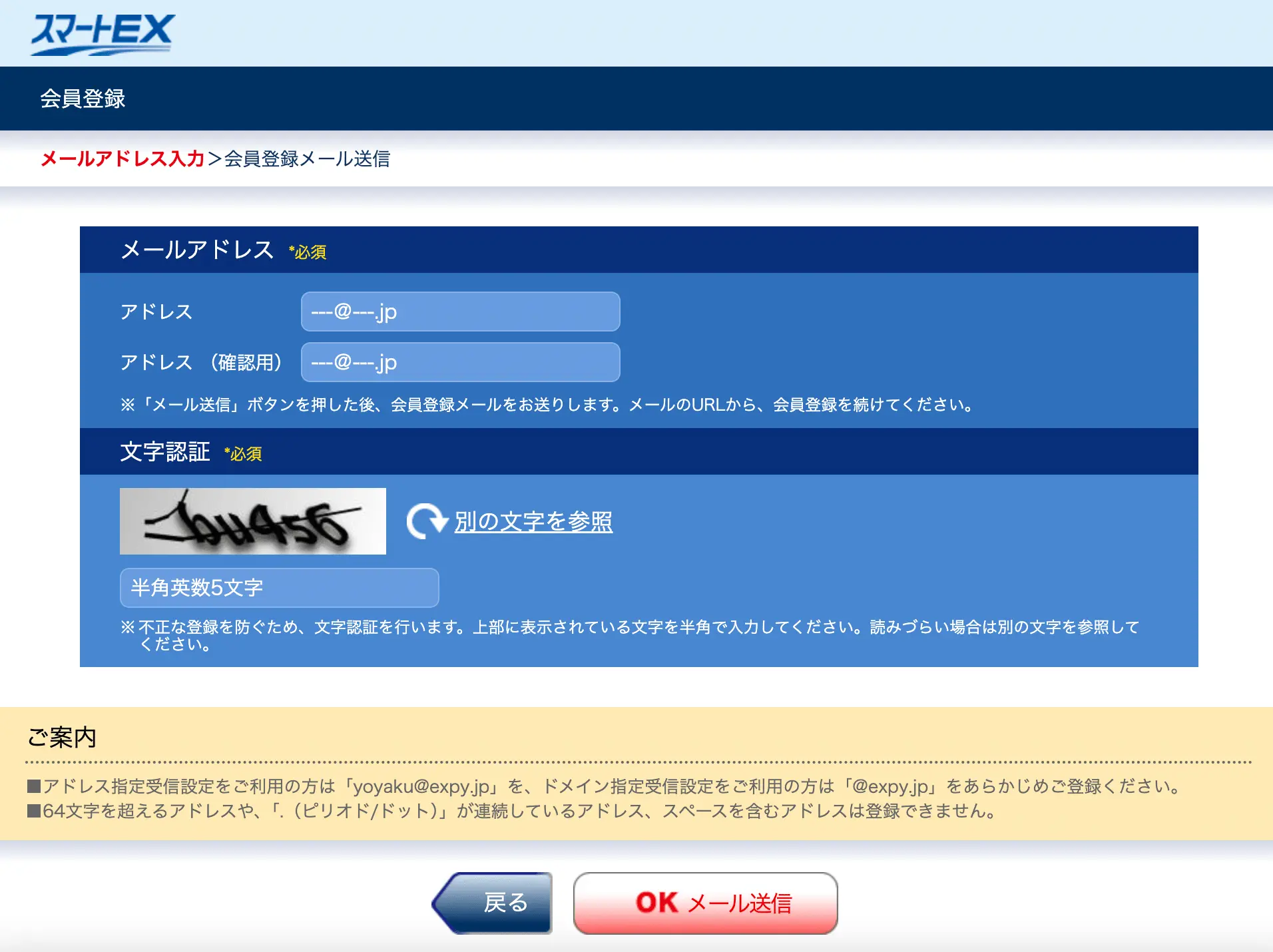
Type your email address twice and press the “OK” button. Ensure the email doesn’t go to the junk mailbox, and set up your inbox to receive email from “@expy.jp.”
To register as a member, you must register with a credit card or transit IC card. Afterwards, you can book a shinkansen ticket on smartEX. Keep in mind, the card's name needs to match the registered member’s name.
You can register on your smartphone at https://smart-ex.jp or the smartEX app “EX” which is also available to download for membership registration.download for membership registration.
Step 2: Terms and conditions
Check your email, and read the Membership Agreement and Privacy Policy. If you don’t have any questions, press the “OK” to agree. Please check its specific supplements for customers from the EU and the UK, the US, Canada, Australia, Singapore, Hong Kong, Malaysia, Taiwan, and Thailand.
Click on the check box and press the agree button.
Step 3: Membership information
Fill out the required fields for your name, phone number, date of birth, login password, credit card information or IC card, email address, and one-time password-receiving method, and press the OK button. IC card information is optional.
Step 4: Card information and one-time password
Input your card number and expiration date, then press the OK button.
What credit cards can be registered with smartEX?
The following credit cards are accepted by smart EX: VISA, Mastercard, JCB, American Express, Diners Club, J-WEST CARD, and DISCOVER. The valid credit card holder must match the member's name and must be 18 years or older.
Go to the ID Verification Process (3D Secure). smartEX Japan requires this process and pre-requisite setting with valid credit card companies for Identity Verification Process; you might need help to use the credit card. Small-size credit cards or "virtual credit cards" will be difficult for refund reservation.
Credit card registration errors
Many users hit an error during membership registration with their credit card. This usually traces back to 3D Secure settings.
Your valid credit card must have 3D Secure active before you register. Call your card issuer and ask them to enable it for smartEX transactions.
If registration still fails, try a different browser or the smartEX app instead. Small-sized or virtual credit cards often cause the same registration and refund reservation issues.
How to register an IC card with smartEX?
If you have an IC card or Suica, you can register it’s 17-digit ID. Then write your email addresses. Now you can record up to three email addresses and pick one address for primary use. Registering more than one address is recommended to ensure Identity security.
Select a method to receive a one-time password, SMS message, or Automated Phone System. When you change your password or information, the system will send you a one-time password.
Finally, press OK to confirm your membership registration.
The registration is completed when you receive the member ID in your email.
How to use smartEX app and website to book a Shinkansen ticket
Here, we go through the step-by-step process on how to buy shinkansen tickets with smartEX.
Step 1: Log in
Go to https://smart-ex.jp or EX app and enter your membership ID (10 digits) and password (4-8 characters), and press “Login.”
Step 2: Reservation menu
Click Reservation and search for your smart ex shinkansen trip. Enter your departure date, time, and departure and arrival stations.
You can buy tickets for up to 6 people in one booking. Only the lead member needs a smartEX account, so travel companions do not need to register.
If traveling from Tokyo to Kyoto, select Tokyo or Shinagawa as your departure station. Choose Kyoto as your arrival station.
Reserve oversized baggage space in advance if needed. This applies to bags between 160 cm and 250 cm in total size.
The system may ask about non-reserved seats on connecting KODAMA or TSUBAME trains. It will also ask if you want direct trains only, with no transfers.
Press the continue button once you finish.
Step 3: Train name designation and enter number of passengers
There are many different types of shinkansen that differ in size and frequent stops. While The smartEx Japan does not know exactly which Shinkansen lines mean what, here is the general breakdown.
To use Tokaido Sanyo Shinkansen, Japan's golden route, select one of the following:
NOZOMI: stops at the least amount of stations.
HIKARI: stops only at the most important stations.
KODAMA: makes all the stops, most frequent trains.
To use the Kyushu Shinkansen, select one of the following:
MIZUHO: stops at the least amount of stations
SAKURA: stops only at the most important stations
TSUBAME: makes all the stops, most frequent trains
Select the train name designation, enter the number of people, and press the continue button.
Current EX Hayatoku discount tiers
JR restructured its early-booking discounts in 2025. Three tiers now apply across Tokaido Sanyo Shinkansen and Kyushu Shinkansen routes.
EX Hayatoku 1: Book by the day before departure for discounted non reserved seats
EX Hayatoku 7: Book 7 days ahead for discounted reserved seats
EX Hayatoku 21: Book 21 days ahead for the deepest discount on reserved seats
Seat numbers are limited for each tier. Some peak travel dates, such as Golden Week and Obon, exclude these discounts entirely.
Step 4: Select train and facility
Check the available seat and press the select button of your preferred train. The “Discount” mark will be displayed for a special “Hayatoku” advance ticket. Green cars are for reservation only
○: Available
▲: To some extent, all seats in a row are sold out
✖️: Not available
-: No information available
Step 5: Select fare
You can select your preferred fare, facility (green car or non reserved car), and seat.
To see seat availability, select a fare and click “view seat map.” You can choose a window or aisle seat on the “seat location” pulldown menu. Then press the continue button.
Step 6: "Round-trip discount fare"
smartEX ended its round-trip discount fare on March 31, 2026. This option no longer appears during booking.
Book each direction as a separate one-way ticket instead. Look for current EX Hayatoku discounts on qualifying routes instead.
If your return trip needs an extra stop, booking through the smartEX site gets complicated. Visit a ticket counter or ticket office for that leg instead.
Choosing a non-reserved seat will show a confirmation message. This message confirms you selected a non reserved seat.
Step 7: Confirm reservation
The screen will say, “Your reservation is not yet complete.”
Then press the “OK Purchase” button to confirm the reservation.
When you receive the email with reservation details, your Smart EX shinkansen reservation is complete.
What type of boarding methods do I use with Shinkansen tickets?
Now you have a shinkansen ticket. How do you use it? There are 3 main methods:
QR code ticket—This can be printed or added to Apple Wallet for iOS users to display the QR ticket.
IC card—Your registered IC card can be used to board Shinkansen.
Paper tickets pickup at the station—Use the EX ticket vending machines or ticket counters at main stations to print your ticket.
How to use the smartex shinkansen ticket?
There are 2 main smartEX Shinkansen tickets: QR code and printed paper ticket.
QR code smartEX shinkansen ticket
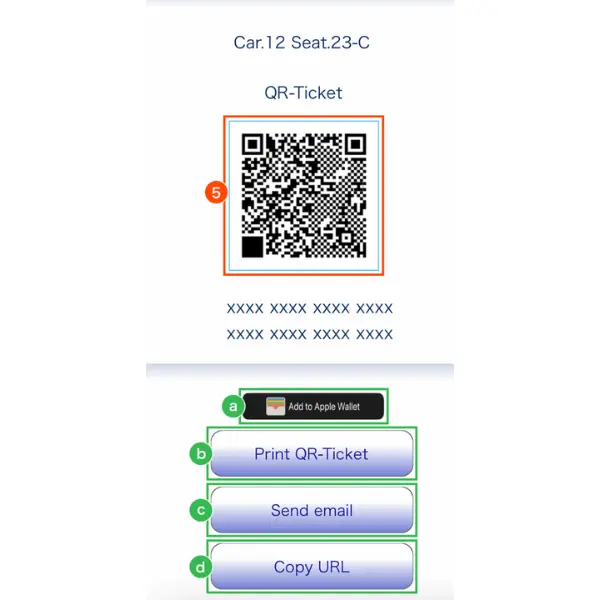
QR Code is a registered trademark of DENSO WAVE INCORPORATED.
To receive your QR smartEX shinkansen ticket, go to “My Trips” → “Details” → “Display QR-Ticket” → Click “Send” and enter the one-time password → “Next” → Now you have your QR Code!
You can keep the smartEX shinkansen ticket QR code in your Apple Wallet, sending it to your email, printing it, or copying the URL to display the QR code again at a later time.
Additionally, you can online use the Shinkansen ticket gate that has a "QR" mark. Hole your QR ticket at the gate scanner.
smartEX shinkansen paper ticket
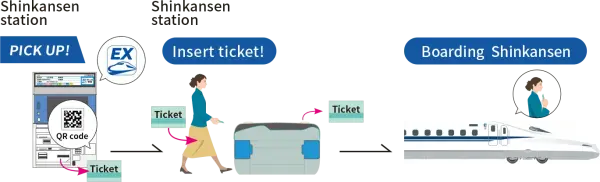
Image via smartEX Japan
You will need to look for a ticket machine with the smartEX shinkansen logo. Let the machine scan your pickup QR code or input the pickup code.
Select the tickets that need to be printed and now you have your printed smartEX shinkansen ticket.
All you have to do is to insert the paper ticket into the ticket slot. Remember to take the paper ticket as you will need it to exit the station.
How to pick up your Shinkansen tickets using your Suica card
This process is optional. If you have Suica or another IC card, you can register its 17-digit ID so you can tap in and out of shinkansen gates.
The great benefit of an IC card is that once you register, you can travel ticketless, and you don't need to worry about a paper ticket.
The 17-digit ID for your IC card is on the back on the bottom right corner.
For Suica, the 17 digits start with JE.
For PASMO, the 17 digits start with PB.
For IOCA, the 17 digit starts with JW.
To enter a Shinkansen gate, place your card on the screen of the ticket gate machine, and a receipt with your reservation information will come out for you with your “seat information.”
To enter a Shinkansen gate from a regular train, use the same IC card to exit the train's entrance and then enter the Shinkansen gate with the card.
If you pass the conventional lines concourse, the fare will not be deducted from the IC card. Please get “seat information” to enter the Shinkansen ticket gate.
How to read your “Seat Information” ticket
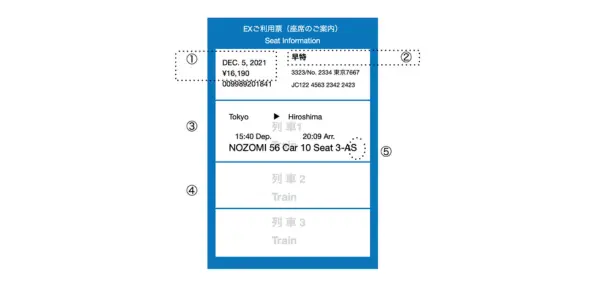
smartEX Shinkansen ticket information
① Boarding date/fare
② 早特: Hayatoku: A early-bird discount for reservations made before the departure date.
③ Boarding sections/departure and arrival time/train and seat reservation.
④ If you change trains, the transfer information will be described.
⑤ “Seats with oversized baggage area” needs to be reserved if there is oversized baggage with dimensions of 160cm or more and 250cm or less.
Frequently asked questions
What is “S Work seat”?
“S Work seat” is only available for EX service members who can use PCs on reserved seat (Car No.70) for NOZOMI Shinkansen and Tokaido Shinkansen only.
It is available only for one adult and not for some holidays and long weekends. You can reserve a seat up to 4 minutes before the departure time. The fare is the same as reserved seats if you are a member of this service.
If I forget my smartEx membership ID, what should I do?
The 10-digit number will be received by email once you have completed registration. So you can check your email, or you can check your ID on your EX app screen.
Can I change my Shinkansen reservation?
Yes. smartEX allows unlimited free changes to your boarding date, station, or seat. You can make changes right up to 4 minutes before departure.
This applies only to travel dates within 3 months of your original ticket purchase. You must also change your reservation before you pick up a paper ticket or tap through the shinkansen ticket gate.
Handle all of this through the smartEX app or website. No ticket counter visit is required.
How far in advance can I book a Shinkansen ticket?
You can book most Tokaido Sanyo Shinkansen seats up to one month before your departure date. This window gives you full access to the interactive seat map.
A limited number of seats open up to one year in advance. These early bookings do not show the seat map right away.
Your exact seat, train name designation, and departure time get confirmed one month before travel. smartEX emails you once this happens.
Booking stays open 24 hours a day. This applies except during scheduled system maintenance.
Where can I pick up my reserved Shinkansen ticket?
Tickets can be picked up at the EX ticket vending machines, a Shinkansen ticket machine, and a ticket counter in the main stations of JR Central, JR West, and JR Kyushu.
Can the Japan Rail Pass be used with smartEX?
smartEX service cannot be combined with other tickets such as Japan Rail Pass, JR Pass, or other tickets for public transportation.
Will the ticket price be lower by using smartEX?
Non reserved seat prices match standard walk-up ticket prices. You save nothing extra by booking these online.
Reserved seats cost about 200 yen less than tickets bought at a ticket counter or ticket vending machine. This applies to most Tokaido Sanyo Shinkansen and Kyushu Shinkansen routes.
Canceling a reservation costs 320 yen per ticket. Confirm your travel plans before you confirm reservation to avoid this fee.
In closing
Buying a ticket and traveling to local cities in Japan by bullet train can be more challenging than flying to other Asian cities because there are so many signs and instructions you may not understand and very few people you can ask for directions or instructions in English at stations.
The smartEX English site works well for simple routes, such as Tokyo to Kyoto. For complicated transfers or a refund reservation, you may still need Japanese-language help.
Check the official smartEX service status information page before major holidays. System maintenance can affect ticket purchase and after hours reservation requests.
Spending too long figuring out your Japanese mail?
Virtual mail + translation services start at 3800 per month. 30-day money-back guarantee.